Powered By Blogger

Download Our New Featured Toolbar

toolbar powered by Conduit
Download our New Featured Toolbar 100% Virus free, no Adware, no Spyware Exclusive! Release of Tutorial on Bluetooth Remote Control setup for PC using Nokia N70/72/Other S60v2 Phones

S60softwaresbyjeet Headlines

SEARCH THIS SITE


Welcome to my Blog.

Site provides you free Reviews, Tips, Tricks and Downloads related to Symbian application softwares for Symbian mobile phones (i.e Mobile Phones with S60 or Symbian Platform), specific to second and third editions. Downloads provided by this site are absolutely FREE. No Spyware, no Broken Links and 100% free from Virus. So always be in touch. 

To facilitate this I have added full featured “S60softwaresbyjeet” toolbar which provides you one click access to many interesting features like – RSS, Online Radio, Quick links to the new post of this site, Search- providing you results which are relevant to search topics related to software for Symbian phones. Use this Tool bar and experience the difference. 

*Note:-This blog is neither affiliated to "www.symbian.com" nor to any of its partners.  All the downloads provided by THIS BLOG is FREE. Users should use the softwares at their own risk. However I will try my best to provide you the softwares that are tested by me.

Thanks!

Email me

AdBrite

Your Ad Here
Earn Dollars Online
1nok.com
payoffers.in payoffers.in click here

Heyzap Games

heyzap.com - embed games
Showing posts with label s60v3. Show all posts

Thursday, March 4, 2010

SymbianGuru AutoProfiles 2.0 S60v3 SymbianOS9.1


SymbianGuru AutoProfiles 2.0 S60v3 SymbianOS9.1 Change profiles according to your personal schedule: AutoProfiles 2.0 released 30.08.2007 including a Bluetooth scheduler, working with recurring meeting and 10 days trial extension! Your mobile rings loud in the business meeting and the boss is angry about this? You wish not to be disturbed by the ring tone in the middle of the night? The right solution for you is AutoProfiles application for Series 60.3. AutoProfiles will change profiles for you automatically, according to your own schedule and to the meetings in your mobile calendar, saving your time and nerves.Now it includes also a Bluetooth scheduler which can be used together with profile change or separately. Auto Profiles performs automatic profiles activation on your Series 60 v3 Symbian Smartphone. Profile change is made using your personal schedule with rules. The schedule is totally adjustable, with options for activation and deactivation of mobile native and user defined profiles. In schedule you can choose among the variety of recurring conditions (once, daily, weekly, on weekdays, on weekends, monthly, yearly). Version 2.0 of AutoProfiles includes Bluetooth scheduler. You can have the Bluetooth status changed automatically according to your schedule: you can turn Bluetooth off, turn it on and choose its visibility status. You can change Bluetooth together with a profile, but you can also change only Bluetooth status without profile change. Auto Profiles reads your mobile calendar entries and activates the chosen profile (for example Silent or Meeting) during the meeting time automatically. This option is preset already, so by default the Profile Meeting will be set during your meetings when you install and activate the AutoProfiles. For your convenience Auto Profiles have Today tab, where all schedules planned for the current day are visible. Key Features: Automatic profile timer based on schedule Bluetooth scheduler includes hidden and visible for all statuses Change to selected profile during a meeting in the mobile calendar Every schedule entry can be activated and deactivated at any time Scheduling of mobile native and of user defined profiles Profile deactivation time can be chosen Overlapping scheduling not a problem due to different priorities for schedule conditions Today tab shows all profile changes scheduled for the current day Autostart function: when active the application starts on the mobile start and stays in the background Workdays are user defined


Download for S60v3

SMSTimer


SMSTimer is an advanced SMS Scheduler application that can handle an individual SMS for 1,600 characters and upto 1,000 SMS at any one point. SMSTimer enables you to send scheduled SMS to one or multiple recipients. This application is tightly integrated with your contact book and native messaging user interface. You have detailed reports from the Sent Items and "real" delivery reports as sent by the network provider.

SMS Timer springs into action every time you send a normal SMS from the messaging application of your phone and inquires if you want to send this SMS now or schedule it for later delivery. There are no limitations on the date, time, or the amount of Scheduled SMS that you can at any time. SMSTimer is infact the world's most advanced SMS Scheduler application as it is tightly integrated with the normal messaging window of your phone and you have access to sent "scheduled" SMS from the Sent Items of your phone.

SMS Timer is not just limited to scheduling SMS, but you also have complete control on the Scheduled SMS.

You can edit, delete or re-schedule the SMS at any time by opening the main interface of the application located in Menu > MyOwn/Applications and then clicking on SMS Timer icon. The application can also be enabled/disabled as per your requirements and supports delivery reports, as per your phone settings, in effect, a truly integrated SMS application.

SMS Timer application works on all Series 60 devices and all relevant Series 60 screen sizes.


Main Features:
- Does not require a separate interface to send SMS. Uses the phones Messaging application.
- Uses full SMS sending capabilities of the phone
- Integrated with Sent Item settings
- Integrated with Delivery Reports
- Integrated with contact book and groups
- Support 1,600 characters
- Small footprint
- Support all international languages
- Can schedule 1000s of SMS for one time
- Edit Scheduled SMS


Download for S60v3

Tuesday, March 10, 2009

WildPalm Ringtone Studio


WildPalm Ringtone Studio is the Unique Phone-based Ringtone Editor! Use Ringtone Studio to speed up, trim or change the sounds for your ringtones.
Load any Midi song and save in a compressed format to save storage space.
Change the instruments on any track of the song – choose from up to 128 instruments.
Mute or change the volume of any track.
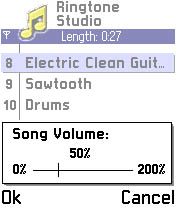
Change the volume of the whole song – manually, or automatically set to maximum.
Change the speed of the song.
Automatically trim silence from the start of a song.
Manually trim the start and end of a song.
Send ringtones via MMS, IR, Bluetooth and Email.
Transpose tracks.
Duplicate and Echo tracks.
Delete tracks.
Automatically duplicate loudest tracks to increase song volume.
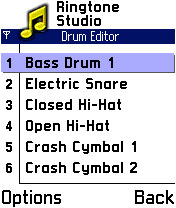
Change individual drum sounds, change volume or mute drums.
Full SP-MIDI data editor - the only phone-based Midi editor to allow full SP-MIDI control.
Playback volume setting.
Improved MMC support - files can be loaded and saved in any location.
Multiple language support - Select language from within application, and easily add new languages.
sending options - send files as Midi, Midi over MMS & compressed .Zip
but the receiver must also have Ringtone Studio installed in order to correctly receive ringtones sent via MMS.

Download for S60 v3
sell ringtones